
A W-4 Form is an IRS document that you fill out when you start a new job, or have a change in life, that affects how much Federal taxes your employer should withhold from your paycheck. In 2020, a new W-4 form was released that changed the way you withhold taxes from your paychecks. It is specifically designed to avoid overpayment of taxes that would result in a large refund and underpayment of taxes that would result in a large tax bill due to the IRS. However, the new form is more complex than the older form and requires more time and effort to correctly complete it with accurate data.
What to Do on your 2026 W-4 Form
You will always have to fill out a new W-4 Form when you start a new job, but you can also update your W-4 Form any time. For instance, it’s recommended to update this form if you have a change in dependents. We also recommend that you update this form if you’ve had large tax bills or refunds the last few years.
In 2026, there are a lot of taxpayers who are receiving larger refunds, thanks to new temporary Federal deductions for qualified tips, overtime compensation, passenger vehicle loan interest, and a deduction for those age 65 or older. However, if you received a large refund, you should update your 2026 W-4 Form. Receiving a large refund means the IRS is taking too much money each paycheck, so updating your W-4 can give you more money in your pocket year-round.
The “New” W-4 Form
Even though the current W-4 Form has been in use for six years, we regularly get questions about how to complete it. Before the new form was released, you submitted “allowances” which were tied to the amount of your personal exemption (for example: 0 for single, 2 for married, 1 for each child, etc.). With the updated form, you fill out five sections with content but instead of a simple number indicating allowances, you must calculate direct dollar amounts.
How to Fill Out the 2026 W-4
Section 1 – Basic Information: this section is simple – provide your name, address, Social Security Number, and then select your filing status.
Sections 2-4: these are the sections that reduce the amount of tax that is taken out of your paycheck through the year. You will only complete the sections relevant to your current situation, but this is where it can start to get more complicated because the sections includes follow-up worksheets that requires you to have extra documentation and use the IRS Withholding Estimator – or do a bit of math.
A little tip is that if you want to make an adjustment quickly, you can skip sections 2 and 3 and just enter the total amounts you want withheld in section 4(c). We still recommend that you go through the process of determining an appropriate amount for section 4, but you can bypass the hassle of the worksheets if you have a general idea of total tax you’ll owe.
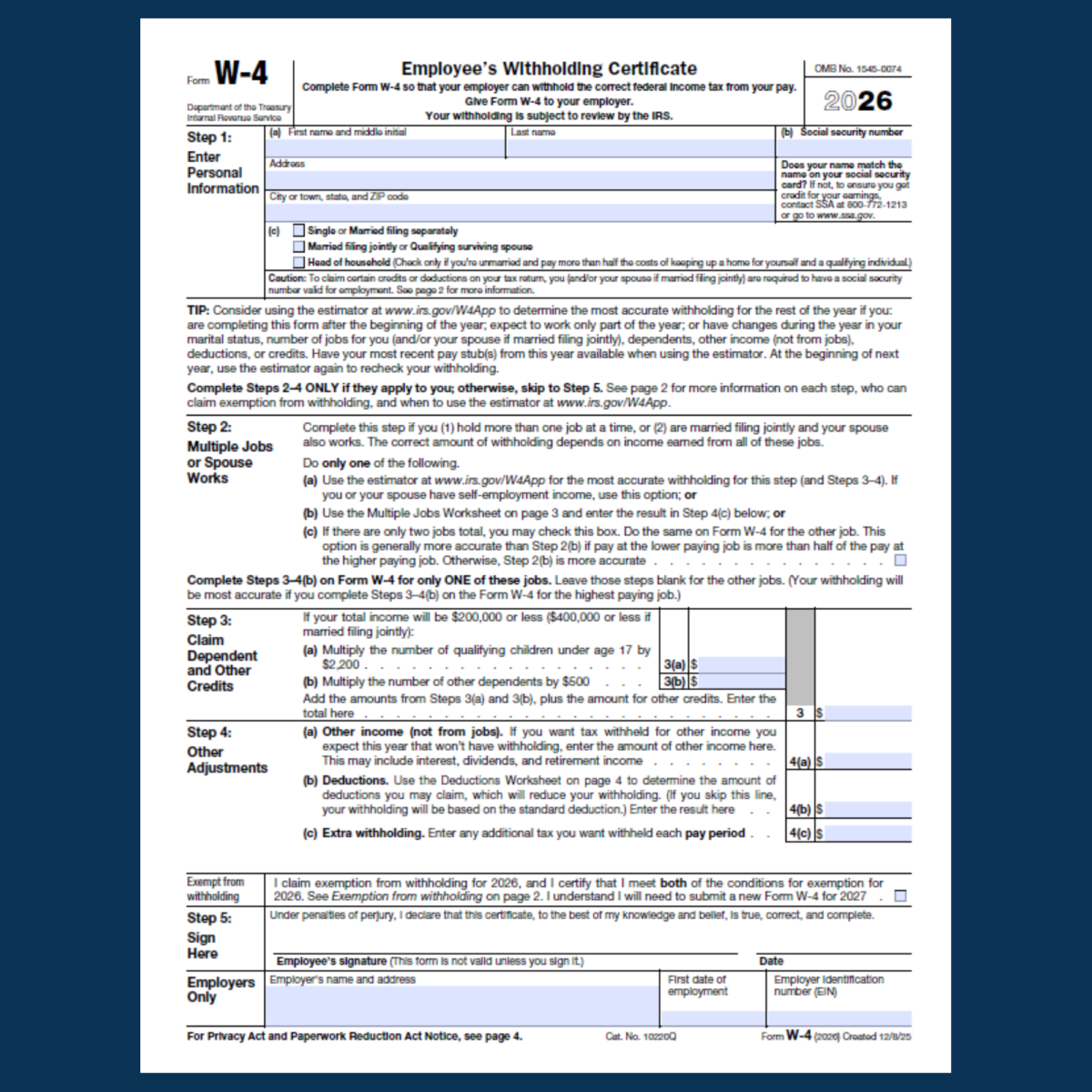
Section 2 – Multiple Sources of Income: If you work more than one job, or you are Married Filing Joint, and your spouse works, you are given three options to estimate your total household income.
- (a) IRS Withholding Calculator: this takes about 25 minutes and requires you to have the most recent pay stubs for jobs, pensions, or annuities for both you and your spouse.
- (b) Worksheet on Page 3: this requires you to estimate your total household income, use a table they provide on page 5 with estimates, and you’ll have to do some quick math.
- (c) Checkbox: check a box that says the other W-4s in your household will all check that box – this is least likely to be accurate, but it is the easiest.
If you select options (a) or (b), after you determine that number, you’ll enter it on line 4(c) in section 4.
Section 3 – Dependents and Other Credits: If you have children or other qualifying dependents, you’ll have to do some math again here. First, complete (a) and multiply the number of qualifying children under age 17 by $2,200 and type/write that amount in 3(a). So if you have 3 qualifying children you’ll calculate 3 x 2200 = 6,600 and write $6,600 on 3(a). If you have any other dependents, such as an elderly adult, multiply that number of dependents by $500 and write that amount in 3(b). Add these numbers together for section 3.
Section 4 – Other Adjustments: This section is for anything else the IRS needs to know regarding your total household income and any deductions you plan to take. There are three sections to consider (although you’ve already completed one of them!).
- (a) Other income not from jobs: add together amount for income such as interest from banks, dividends, and any retirement income can be added together and entered on line a.
- (b) Other Deductions: using the worksheet on page 4, add together any other deductions you may have. This includes qualified tips, overtime compensation, passenger vehicle loan interest, and a deduction for those age 65 or older. If you itemize, it also wants you to add medical and dental deductions, charitable donations, mortgage interest, and more.
- (c): Additional Tax: If you completed (a) or (b) in section 1, you should have already entered the number here.
Section 5 – Signature: The easiest of all the sections, you just sign and date here and your employer will do the same.
Update Your 2026 W-4 Form
As always, clients who are concerned or have questions are welcome to call our office to have a conversation about their W-4 and what to say to an employee who gets a tax bill they didn’t expect.

Erann Thompson
As a Principal and the Director of Advisory Services at Avizo, Erann collaborates closely with business owners to identify the optimal mix of accounting cloud applications, aiming to enhance efficiency and profitability for your business.
